Friday, November 17, 2006


Free Audio Books?

LibriVox (librivox.org) provides free audiobooks from the public domain. The catalog includes books, short works, historical documents, poetry, children’s lit, and non-fiction. Worried about the copyright? All of the works are in the public domain and are not covered by copyright. In addition, Librivox has chosen not to copyright anything they do. “This means others can use our recordings however they wish, including for commercial purposes.”

Thursday, November 16, 2006

How Much do you Weigh on Mars?

I saw a post here and thought it was worthing mentioning.

The NASA Website has a great tool to help kids explore the solar system. http://solarsystem.nasa.gov/index.cfm?Display=Flash

It is all flash based, so it should grab the attention of students. It start with the Sun, covers all the planets, and even includes asteroids and comets. Each stop on the Explorer just has a quick overview, so it won't overwhelm younger visitors. The real magic happens when you follow the about link. There you will find a slightly longer overview, information about the planets moons, an extensive gallery, facts and figures, and a Kids Eye View (which is where I learned I only weigh 77 lbs on Mars).

This is just begging for a webquest.


Don't stop there, the NASA website has a lot more to explore. More pictures, more videos, more interactives, and even some downloads.

Wednesday, November 15, 2006

Google Earth Rolls Back Time

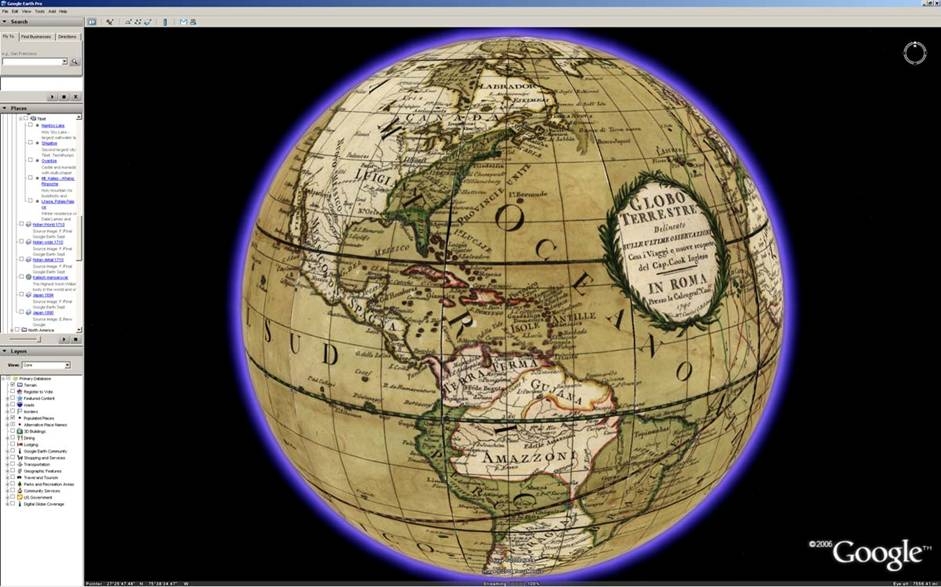
Google has updated Google Earth, but it takes you back in time. If you are using the latest version of Google Earth, go to the layers section and select Featured Content. Now find Rumsey Historical Maps.

Now you can see the world like those who saw it in 1790, or how Lewis and Clark saw it in 1814. I counted a total of 16 old world maps.

Very cool and worth a look!

Monday, November 13, 2006

Better than Google Earth?


http://www.flashearth.com/

Just found this site from EduBlog - it has a much better image of my home than any others I have found... one-stop shopping.
You can also link directly to what you found.
My House
I especially like that you can see the terrain better than on Google Earth.

Also, and perhaps the best aspect of Flash Earth is that it'll run on Windows 98 machines!!!

Monday, November 06, 2006

Graphic Organizers

This post was delievered straight to my inbox this morning. It was a forward of a forward all about graphic organizers. Copy the links, paste the links, and bam, I am done. Hope they help.

http://graphic.org/links.html

Friday, November 03, 2006

PowerPoint: Just Say No Clip Art

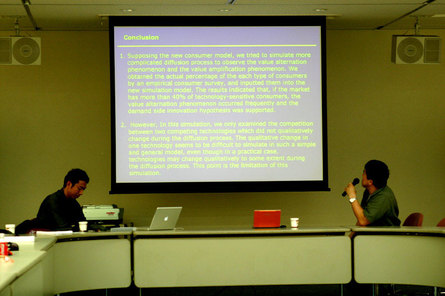
PowerPoint is a wonderful tool. If I have presentation to make, I always use it. It can turn a boring speech into a dynamic one. PowerPoint is also the main culprit behind Death by PowerPoint. Everyone has seen one of these presentations. Just look below...

photo from Zach Graham

A ton of text on a slide is boring and has me reaching for a sodoku puzzle. Just remember less is more. Another thing that gets me in the sodoku mood is Microsofts Clip art. It served a great purpose back in the day. With photo sharing today, it should be banned.

On October 21, Boston broke the record for most lit jack lanterns. This record was formerly held by Keene, New Hampshire. Which one of these do you think would capture your audience.


Don't worry about the lack of text, remember less is more. Plus you want the people focusing and listening to you, not on your bad PowerPoint or a sodoku puzzle. If you really want them to have the details, give them a print out of your notes.

Now, where do you find this photos....

www.flickr.com
www.sxc.hu/

You can also google stock photos for a bunch more sites. Just remember to give credit to the owner.

iPod Buying Guide


Being in charge of technology for a school, I often get asked for recommendations. The last couple of Christmases it has been the iPod. So here is my 2006 updated version.

The iPod Shuffle

This is the most basic iPod. It has no screen, it just clips to your clothes. I think of this as a second iPod and is perfect if you love to listen to music while exercising. It only comes in one size, 1 GB which holds 240 songs. It is only
available in aluminum.

The iPod Nano
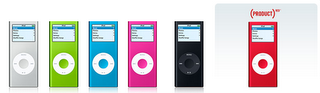
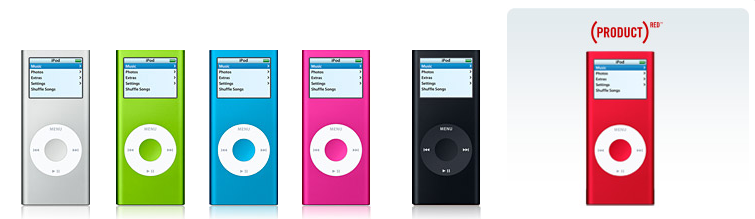
This is the middle of the road iPod and a great place to start. They come in three sizes and six colors, specs are below. These will display your photo, but does not do any video. These are flash based, so they can handle any exercise.

The 2 GB version costs $149.00 and will hold 500 songs. It only comes in aluminum.
The 4 GB version costs $199.00 and will hold 1000 songs. It comes in aluminum, green, blue, pink, and red.

The 8 GB version costs $249.00 (same as 30 GB iPod) and will hold 2000 songs. It comes in black and red.

The iPod
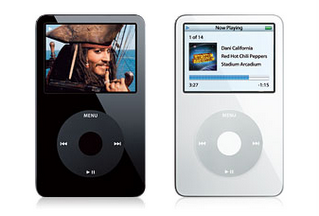
This is the top of the line iPod. It comes in two sizes and colors, specs are below. These will play TV shows and Movies bought in the iTunes Store, and even your own home movies and photos. You can also purchase games. These are hard drive based, which means you wouldn’t want to use this while jogging.

The 30 GB version costs $249.00 and will hold 7500 songs. It comes in black and white.

The 80 GB version costs $349.00 and will hold 20,000 songs. It comes in black and white.

iTunes

When you buy an iPod you will need to download iTunes. iTunes is the management software for the iPod. Essentially, anything in iTunes will be put on your iPod when you hook it up. iTunes also has a built in store to purchase music (.99 a song/9.99 an album), audio books (price varies), TV shows (1.99 a show), and Movies (9.99-14.99). I love the software and it is very easy to use. I believe this is what has made the iPod so successful.

One important thing to remember, it is possible to have music on your iPod without spending a cent in the iTunes store. If you put a CD into your computer, iTunes can copy (rip) the CD to your hard drive. The next time you connect your iPod that CD will be transferred over. Every CD you own can be put on your iPod.

iTunes also has a wonderful selection of podcasts. A podcast is broadcast that you can subscribe to that is automatically updated. These are typically audio, but there are some video podcast now. Podcasts are typically free and you can find a podcast about anything.

Where to Buy

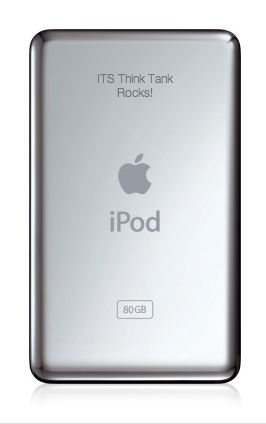
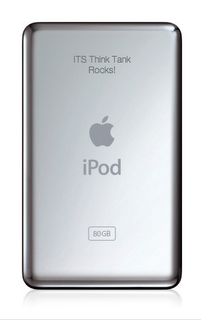
Apple sets the prices of these, and rarely do you find a discount. Amazon.com and Sam’s may have a slightly lower price. Every iPod I have purchased, or helped purchase, has been from apple.com. They offer free shipping and are almost always in stock. The coolest thing about ordering from apple is the engraving. Apple will engrave the back of any of the iPods for free.
Hope this guide helps!

Tuesday, October 31, 2006

Google buys Jotspot

It seems Google just acquired jotspot. I had never heard of jotspot before. After a little searching it seems to be a pretty powerful wiki, much more than pbwiki. Of course they closed the registration, but you can put in your email address to be notified when it opens back up. I also found a link to a video tour of the site from google's cache, look at the bottom of the page. I must say I am impressed.

Some of the features are sharing documents, group calendars, and spreadsheets. If you have gmail, you already have 2+ GB of storage space. Could this shape up to be the interface or front end of Google's office suite or Gdrive.


Monday, October 30, 2006

Back to School with the Class of Web 2.0


While I was doing some reading over the weekend I ran into this blog. This is the most comprehensive list of web 2.0 tools for education I have seen. It is actually a three part series. Part one focuses on organizing, grade books, resume building, and research. The focus is not just teachers, student web 2.0 strategies are also mentioned.

Part two looks at online office applications including word processing, presentations, diagrams, spreadsheets, and calendars.

The third and final part focuses on "real world" educational scenarios in blogging, photo/video sharing, podcasting, and wiki's.

Be sure to check out the comments too; lots of good links in there.

Image from http://www.francispisani.net/

Friday, October 27, 2006

Science Podcasts - Gotta Minute


So you want to use podcasts to help your students learn science. But don't have time to listen through all the podcasts to see if they are worth while? Check out Scientific American Magazine. They offer a daily podcast called 60-Second Science. These are quick reports and commentary from the world of science. It only takes a minute!

These would be great for warm ups/bellringers or as a catalyst to journal writing. They are high interest as well, at least IMHO. The most recent (10/27) 60-Second Science podcast discusses vampires of New England.

You can listen to these podcast from their homepage or subscribe to them in iTunes (iTS link). Also published is a weekly Science Talk podcast (iTS link), where scientists and journalist discuss the latest developments is science and technology The homepage also features a blog, videos, and a place at ask a scientist a question.

Thursday, October 26, 2006

Scary Stories

"To be buried while alive is, beyond question, the most terrific of these extremes which has ever fallen to the lot of mere mortality." From The Premature Burial by Edgar Allen Poe

Google's Book Search has made a collection of some of the greatest classic scary stories. You can find them at www.google.com/scarystories. The Legend of Sleepy Hallow, Dracula, and Frankenstein are just a few of the stories you will find. Because this is Google, you can search every word in each story. Plus, some of these books are in the public domain; look for the download button to save and print.

Tech Tags:

Persuasion Map

The website Read Write Think offers a ton of free online student materials to support literacy learning. A cool one is The Persuasion Map, an interactive graphic organizer that lets students map out their arguments for a persuasive essay or debate. Student can do this on a computer and print it out. My only advise, make sure it printed before they close it; you cannot save these to work on later.

Monday, October 16, 2006

Principal Blogging Project

If you know of any principals interested in blogging please share this link--- http://principalblogs.jot.com/WikiHome
Original post here.

Technorati Tags:

David Warlick's Keynote is Online Now!

The Keynote for the k12OnlineConference is online now!
http://k12onlineconference.org/

Technorati Tags:

Links from Newsletter Oct. 13th

Google for Educators
http://www.google.com/educators/index.html
This is a wonderful resource! There are teacher guides to 12 Google products, examples of how educators are using them, and lesson ideas. You can also subscribe to the Google Teachers’ Newsletter on this page.

Web 2.0 Applications
Back to school with the class of Web 2.0 Part 1 Compilation of Web 2.0 applications. Red arrows indicate ones particularly suited for education.

Resume Tool
http://www.emurse.com/ Create resumes online or upload an existing one. Provides distributing tools and will keep track of who has seen it. You can also make your resume password protected or choose not to show personal information.

Color Palette Generator Tool
http://www.degraeve.com/color-palette/ Enter the url of an image and get the color palette (the 6 digit number beside the color is the Hex Value – this can be entered in Frontpage when you go to More Colors – you will see the top field asks for a hex value – type in the 6 digits and you will have that color!).

Just for Fun
http://www.sr.se/P1/src/sing/#

Friday, October 06, 2006

Links from Newsletter Oct. 6th

Learn something
http://www.internet4classrooms.com/on-line.htm Technology tutorials.

Up and Coming
http://k12onlineconference.org/
Online free conference Oct. 23-27 and Oct. 30-Nov. 3

Subject Areas
http://arcademic.altec.org/ Online games for basic math, language arts, vocabulary and thinking skills.
http://medtropolis.com/VBody.asp Virtual Body (English and Spanish versions).
http://www.goodcharacter.com/ Lots of information on character education.

Blogs
http://www.lifehacker.com/ “Lifehacker recommends the software downloads and web sites that actually save time.”
http://www.parenthacks.com/
"a collaborative weblog of practical parenting wisdom”.

Just for Fun
http://www.jacksonpollock.org/

K12Online 2006 Conference

K-12 Online Conference 2006

Spread the word! Download a flyer here.

Wednesday, May 17, 2006

Google Donates Sketch-Up Pro and Google Earth to Maine 1:1 Program

This is way cool - imagine the uses...

Combination of Google Earth and the new Sketch-up Pro to redesign communities and placement of new buildings.

From Tim Lauer's Educational Technology blog.

Wednesday, May 03, 2006

Take a student to workshop post

Read the post here: http://weblogg-ed.com/2006/take-a-student-to-workshop-day/
Great idea for terrified-of-technology teachers and administrators!